TV Without Cable: 7 Ways to Watch Live Channels in 2026
Contents:
- The Direct Answer
- Why This Works Now
- Seven Ways to Watch Live TV Without Cable
- Over-the-Air Antenna
- Live TV Streaming Services
- Free Ad-Supported Streaming Channels (FAST)
- Broadcasters’ Own Apps and Websites
- Your Internet Provider’s Streaming TV
- International Online TV Services
- On-Demand Libraries to Fill the Gaps
- Regional Differences: Northeast, South and West Coast
- A Real-Life Example
- Putting a Lineup Together: Three Sample Combinations
- Quick Setup Tips
- Exceptions and Nuances
- Frequently Asked Questions
- Can I really get live channels without cable?
- What is the cheapest way to watch TV without cable?
- Do I need special equipment?
- How do I watch channels from another country?
Picture Sunday evening: the soft click of a remote, the glow of a screen filling a dim living room, a pot of tea going lukewarm beside you, and no bulky cable box humming in the corner. That scene is within easy reach. TV without cable works through seven practical routes in 2026, and this guide walks you through each one, with honest notes on cost, quality and who each option suits best.
The Direct Answer
You can watch live channels without cable through an over-the-air antenna, live TV streaming services, free ad-supported channels, broadcasters’ own apps, your internet provider’s streaming TV, international online TV services and on-demand libraries that fill the gaps. Most households combine two or three of these rather than rely on one.
Why This Works Now
Three things changed. Internet speeds rose, so a household can stream HD video to several screens. Smart TVs and inexpensive streaming sticks put app stores in every living room. And broadcasters realized viewers wanted live channels without a long contract, so they built products for exactly that. The result: cable is optional, and you can assemble a lineup that fits your habits and budget.
Seven Ways to Watch Live TV Without Cable
1. Over-the-Air Antenna
A one-time purchase of an indoor or outdoor antenna gives you local broadcast channels, including news, major networks and some sports, for no monthly fee. Quality depends on distance to the transmitters and terrain. It is the cheapest option and an excellent backup when the internet drops.
2. Live TV Streaming Services
Subscription services deliver bundles of live channels over the internet with a cloud recorder in many cases. They are flexible, month to month and available on most devices. The trade-off is price: a big bundle can approach what cable charges, so compare cost per hour of actual viewing.
3. Free Ad-Supported Streaming Channels (FAST)
Services such as Pluto TV, Tubi and Samsung TV Plus offer free channels supported by advertising, from classic series to news and movie loops. They cost nothing but time spent on commercials, and the channel selection is more “lean-back” than headline sports.
4. Broadcasters’ Own Apps and Websites
Many news channels, networks and sports leagues stream live or offer clips in their own apps. Some require signing in with a TV subscription, but others, particularly news, are free. Handy for specific needs, though juggling many apps gets old quickly.
5. Your Internet Provider’s Streaming TV
Telecom companies increasingly offer IPTV or app-based TV without traditional cable boxes. This often comes with local channels and regional sports in one place. Contracts and equipment fees vary, so read terms before signing.
6. International Online TV Services
If you want channels from another country, such as news and shows in your first language, specialized services stream them over the internet to phones, tablets, computers and smart TVs. https://prostotv.com/ru/ is one example: it publishes its lineup openly, and you can browse the https://prostotv.com/ru/channels/ page before paying. For expats and bilingual families, this is often the missing piece.

7. On-Demand Libraries to Fill the Gaps
Live TV does not cover everything you want to watch. Catalogs of films and series let you watch when you like. An on-demand movie library alongside live channels makes a surprisingly complete setup, so you are never stuck with nothing to watch.
Regional Differences: Northeast, South and West Coast
- Northeast. Dense cities mean many broadcast stations, but tall buildings and crowded airwaves can complicate antenna reception. Fast fibre and cable broadband make streaming services strong here.
- South. Storms and spread-out towns make an antenna a handy backup when internet or power fails. Rural areas may have slower broadband, so test speeds before relying only on streaming. College football is a major draw, and rights vary.
- West Coast. Hills and mountains can block antenna signals, while live events air early in the day because of the time zone. A recorder or replay feature helps a lot.
A Real-Life Example
Consider a composite household. Priya and her partner in New Jersey paid for a large cable bundle and used five channels. They switched to a small antenna for local news, a month-to-month live streaming service for sports season, free channels for background viewing and an international online service for her parents’ language channels. Their monthly bill dropped by more than half, and they cancel and restart subscriptions seasonally. The key was not any one product, but matching each service to a specific habit.
Putting a Lineup Together: Three Sample Combinations
- The frugal setup. An antenna for local channels, free streaming channels and a broadcaster’s news app. Monthly cost: close to zero beyond internet.
- The expat setup. An antenna or a basic streaming service for local TV, plus ProstoTV for live channels from home. ProstoTV runs on smart TVs, phones and computers, and you can look through its lineup before you pay.
- The sports-and-news setup. A live TV streaming service for the season and a free news app. Pause the paid part off-season.
Cost check: add every subscription, then divide by the hours you watch. If ProstoTV or any other service costs more per hour than you can justify, drop it for a month and see whether you miss it. That small experiment is the honest way to decide. Before paying, browse https://prostotv.com/ru/channels/ to compare the lineup with what you actually watch.
Quick Setup Tips
- Test your internet speed in the evening. Aim for about 8 Mbps per HD stream.
- Put the router in a central spot, or use a cable to the TV.
- Install apps from official stores only.
- Try each service’s free trial or month-to-month plan first.
- Keep an antenna as a backup if your area has good reception.
A friend once told me her biggest surprise was how little she missed her old remote with its 80 buttons. After cutting cable she used ProstoTV for news in her first language, a free channel for background shows and a library of films for weekends. The setup took one afternoon, and the bill dropped enough to pay for a better router.
Exceptions and Nuances
- Live sports can be tricky. Rights are split among many broadcasters, so one service rarely covers everything.
- Internet is the foundation. Plan for around 6 to 8 Mbps per HD stream and more for several screens.
- Costs add up. Three overlapping subscriptions can equal a cable bill. Review them every quarter.
- Availability varies by country. Rights are territorial, so check any service’s lineup for where you live.
Frequently Asked Questions
Can I really get live channels without cable?
Yes. Antennas, live TV streaming services, free channels and provider apps all deliver live TV without a cable box.
What is the cheapest way to watch TV without cable?
An antenna for local channels plus free ad-supported streaming costs little or nothing per month beyond internet service.
Do I need special equipment?
Usually not. A smart TV, streaming stick, phone or computer with a stable internet connection is enough.
How do I watch channels from another country?
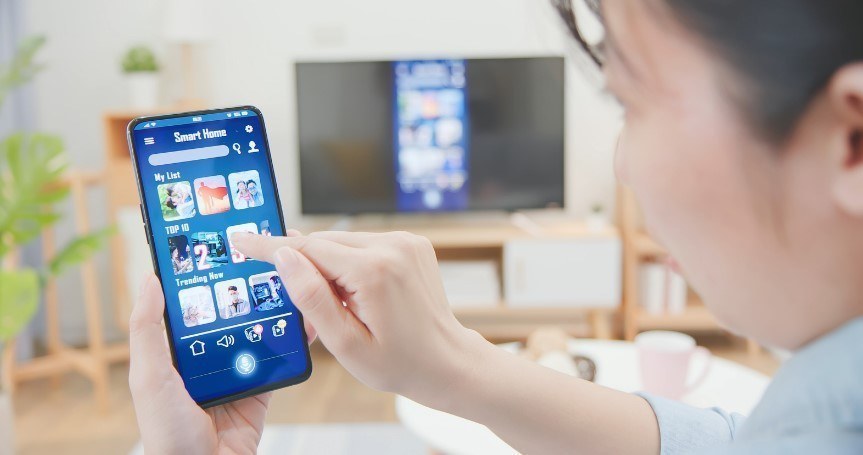
Use a licensed international online TV service, for example ProstoTV, that offers the channels in your country, and check the lineup first.
Cutting the cable does not mean cutting live TV. Start with one or two of the seven routes, test them for a month, and keep what you really use. Your remote will click just as happily, and your bill will thank you.
ARTICLE_HTML_END